
How to register a domain and choose a hosting plan
A picture-by-picture walkthrough of ordering with OnPoint Hosts — from picking a plan to your website going live. Follow along in another tab as you go.
Start with a hosting plan
Choose your plan first and add your domain along the way. This is the quickest route and the one that gives you your free domain. It’s the route this guide follows.
Start with a domain name
Just want to secure a name first? You can search for a domain on its own and add hosting at the same time or later. See the domain-first route.
Your journey at a glance
Step 1Choose your hosting plan
- Go to our pricing plans on the home page.
- Compare storage, email accounts and how many domains (websites) each plan allows.
- Click Add to basket under the plan you want. You’ll be taken to our secure order system.
Step 2Pick your domain name
The order system now asks which domain your hosting is for.
- Leave Register a new domain selected.
- Type the name you want (without “www.”) and choose an ending such as .com or .co.uk.
- Click Check to see if it’s available.
- If it’s free, click Continue. If it’s taken, try a different name or ending — we’ll suggest alternatives.
Step 3Choose how often to pay
- Under Choose Billing Cycle, pick how you’d like to pay for your hosting.
- Add any optional extras you want (you can always add them later).
- Check the Order Summary on the right, then click Continue.
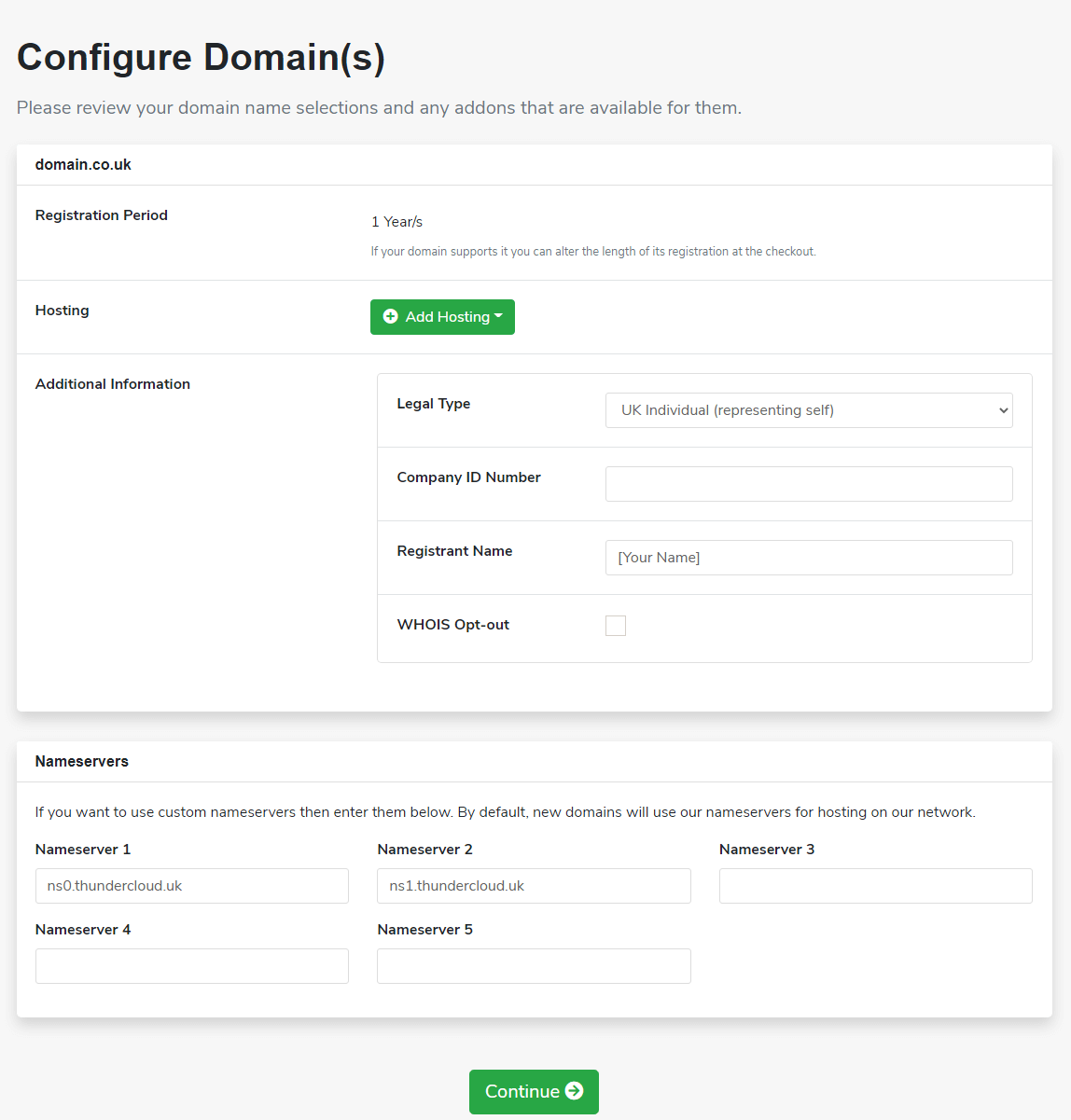
Step 4Configure your domain
Next you’ll confirm the details for your domain. Most of it is filled in for you.
- 1Registration Period — how many years to register for. You can change this at checkout.
- 2Additional Information — only appears for some endings. For .uk domains choose your Legal Type (e.g. UK Individual or UK Limited Company), add your Company ID Number if you’re a company, and enter the Registrant Name — the person or business who will legally own the domain.
- 3Nameservers — leave these as they are: ns0.thundercloud.uk and ns1.thundercloud.uk. They connect your domain to your OnPoint hosting.
- 4Click Continue.
Step 5Review your basket
- Check your hosting plan, billing cycle and domain name are all correct. Use the edit link to change anything.
- Have a promotional code? Enter it and click Validate Code.
- Click Checkout.
Step 6Enter your details and pay
- New customer? Fill in your personal information and billing address. Already have an account? Click Already Registered? and log in instead.
- Create a strong password under Account Security. You’ll use it to log in to your Client Area.
- Choose your payment method and enter your payment details.
- Tick to agree to the Terms of Service, then click Complete Order.
Step 7What happens next
Order confirmation
An email confirming your order and your invoice arrive straight away.
Hosting welcome email
Once payment clears, your account is set up and we email your cPanel login details.
Verify your domain — action needed
For .com, .net, .org and similar, you’ll get an email asking you to confirm your contact details. Click the link within 15 days or the domain may be suspended.
Your domain goes live
Usually within a few hours, occasionally up to 48 hours while the internet catches up.
You can manage everything from your Client Area: log in to cPanel, renew your domain, pay invoices or open a support ticket.
Next: build your website. Follow The Web Toolbox’s free step-by-step guide — from your first page to being found on Google, all tested on OnPoint hosting.
Prefer to start with a domain name?
You can register a domain on its own — for example to secure a name before you’re ready to build a site.
- AOpen domain search
From the menu choose Store → Register a New Domain, or start here.
- BSearch and add
Search for your name and click Add to Cart on the one you want.
- CAdd hosting (optional)
On the Configure Domain(s) screen, click the green Add Hosting button to bundle a plan in now.
- DFinish as above
Carry on from Step 4: configure your domain, review and check out.
Hosting sorted? Now build your website
Free step-by-step guides from The Web Toolbox
Our sister site teaches you to build a professional website yourself — every guide is written for OnPoint hosting.
- Go live on OnPointNameservers, verifying your domain, cPanel and HTTPS — with OnPoint’s own screens.
- Find your way around cPanelWhat every cPanel section does, and the handful of tools you’ll use most.
- Set up your emailCreate addresses at your domain, connect your phone and Outlook, and stay out of spam.
- Build your first pageA modern HTML5 template, explained line by line, ready to upload to cPanel.
- Create your logoFree logo tools and the image sizes your site and social media need.
- Add a faviconThe small icon for browser tabs and Google results, and how to upload it.
- Sitemap & robots.txtHelp Google find every page of your new site.
- SEO checklistTitles, descriptions, speed and structured data, in plain English.
The Web Toolbox is run by the same company as OnPoint Hosts. Free to read, no sign-up.
Common questions
How long does it take to get my website online?
Placing the order takes around 10 minutes. Your hosting account is usually set up as soon as payment clears, and a newly registered domain normally starts working within a few hours. Occasionally it can take up to 48 hours for a new domain to be recognised everywhere on the internet.
Is the domain really free?
Yes. New hosting plans include a free .com, .net or .org domain for the first year when the hosting is paid annually (one year in advance). From year two the domain renews at our standard renewal price.
I already own a domain somewhere else. Can I still use it?
Yes. At Step 2 choose either “Transfer your domain from another registrar” to move it to us, or “I will use my existing domain and update my nameservers” to keep it where it is and point it at your OnPoint hosting. Our transfer guide walks through moving a domain step by step.
What are nameservers, and do I need to change them?
Nameservers tell the internet where your website and email live. When you register a new domain with us they are filled in for you (ns0.thundercloud.uk and ns1.thundercloud.uk), so you do not need to change anything. Only change them if you have been told to by another provider.
Why have I received an email asking me to verify my domain?
Domain registries require the owner’s email address to be confirmed for .com, .net, .org and similar domains. Click the link in that email as soon as it arrives — if it is not confirmed within 15 days the domain can be suspended until it is.
Can I change my hosting plan later?
Yes. You can upgrade or downgrade from your Client Area at any time without losing your website or starting again.
Ready to get online?
Pick a plan and have your website live today.
Stuck at any step? Contact our UK support team.
*Free domain applies to new hosting plans paid annually. Renewal pricing applies from year two. All prices exclude VAT.